What Is DMX?
If this is your first venture into stage lighting, it may seem complicated but it is really simple if you know the concepts involved. DMX is the main "language" that all stage lights use be told what to do from a lighting console, software or another hardware controller. I will break it down into very simple terms.
How It Works
To put it simply... DMX has what is called universes. A universe is nothing more than a collection of 512 "Channels". Every lighting fixture has "Channels". A channel is a holder of a value for a certain purpose on a fixture. It will accept a number from 0 to 255. For instance, Any RGB fixture will have at least 3 channels. A Red channel, a Green channel and a Blue channel.
To make the fixture all red, Just make the Red channel anything > 0. The higher the number, the brighter the color. 255 is the brightest. To make it all green, make the green channel any number > 0. The same with the blue channel. But... if you want to do other colors, you need to mix color channels. For instance to make orange, you would bring up the red channel and the green channel. To make purple, you bring up the red and blue channels. To make a cyan color, bring up the green and blue channels. The numbers can be any value between 0 and 255 to make shades of colors. Turn the blue channel to 255 and then the red to 255 and you get pinkish color. Leave blue at 255 but bring the red down to about 128 and you get a purplish color. That's color mixing.
Most fixtures will have other channels in most cases. Moving head fixtures will have Pan and Tilt channels to move the head in different directions. Some RGB fixtures have an intensity channel that brightens or darkens the color mix you have setup on the RGB channels. Some fixtures will also have a White channel or an Amber channel or a UV channel also in addition to the RGB channels.
So to put it simply, a controller (like GigLights) outputs DMX values through a DMX controller and that controller is attached to your lights through DMX cables. You can come out of the controller and into the first light. Then from that light, you run a cable to the next light and so on until all lights are connected to the "chain". Remember though... a controller handles 1 universe of 512 channels. So if one of your fixtures uses 7 channels and you have 10 fixtures, that is 70 channels you are using. If all of your fixtures are 7 channel fixtures, you could put about 73 fixtures on that one universe since 73 fixtures times 7 channels is 511 channels. That is below the 512 channels you can use for that universe.
If you need more than that, you can add another controller that gives you 512 more channels (Universe 1). Big concerts may use 100s of universes. but we are not doing that. We probably barely need one universe for a bar band.
So if a fixture uses 7 channels, the controller needs to know what they and where they are. You also will map multiple fixtures into the universe. To have multiple fixtures in the universe, your first fixture will be set to Address 1. It will occupy 7 channels of the universe if your fixture has 7 channels (1,2,3,4,5,6,7). Your next fixture will be set to address 8 and will use 7 channels since the fixture has 7 channels (8,9,10,11,12,13,14). Your next fixture's address will be 15, etc... GigLights makes this process very easy.
If your next fixture has a different amount of channels, just do the same method, but with a different number of channels.
Most light fixtures have a display where you set the starting address but some have little dip switches you have to use to set the DMX address but all the ones I have, have a display on the front that allows you to set the starting address.
So DMX is the "protocol" that is used to comminucate with your stage lighting. It begins with Universe 0 which is one controller. It has 512 channels available. Each channel can have a value of 0 to 255 to controll whatever that channel is set to do on the fixture.
Some spotlights only have 1 channel. That channel is just a dimmer for the spotlight where 0 is off and 255 is full brightness, 128 would be half dim. Fixtures that do color will have a minimum of 3 channels (Red, Green, Blue). A lot of the fixtures will have certain channels that do special effects like a strobe channel and other types of effects channels. When you buy a fixture, it will come with a "map" of the fixture's channels and what they do. You use that channel map to create a fixture definition in GigLights. Once you have that definition, you will map multiple fixtures into the "Universe".
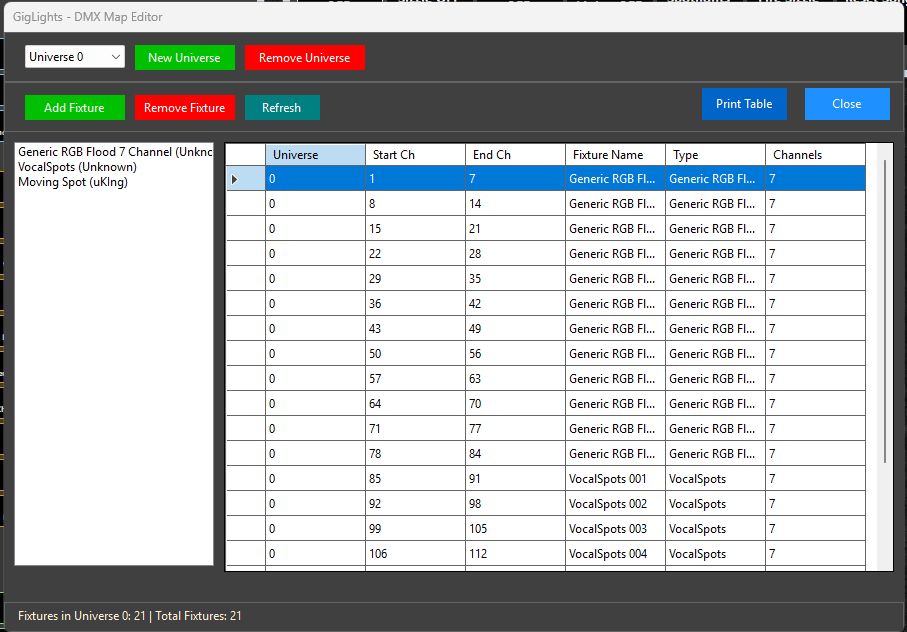
Above you see GigLights DMX map. You can see we are using Universe 0 (the first controller plugged into the USB port). Each one of the lights I'm using has 7 channels (right column) . You can see how they are mapped into the universe. The start channel is the address you will set on each fixture when setting them up. This map tells the lighting console or software (GigLights in this case) where each of your fixtures are and how to talk to them.
It looks more complicated than it is. Once a fixture definition has been created, it is available in the DMX map editor. You just select it and GigLights will take care of all the math and it it in the next available address. If you have multiple of the same fixture, just keep choosing the same one and gigLights will map it for you. When done, GigLights allows you to print out the map so you can take it to your lights and map the Start Channel address on your fixtures.
So to sum up... Your fixtures sit somewhere in a DMX universe (which is 512 channels) by setting the address on the fixture. Each one of those channels can be 0 to 255 in value. Fixtures have multiple channels unless a single channel spotlight. A fixture beginning address sits somewhere in the Univwrse (512 Channels). The channels on a fixture control different things on the fixture depending on the fixture's features.
Below is an example of how DMX lights are wired and the DMX addresses are set...
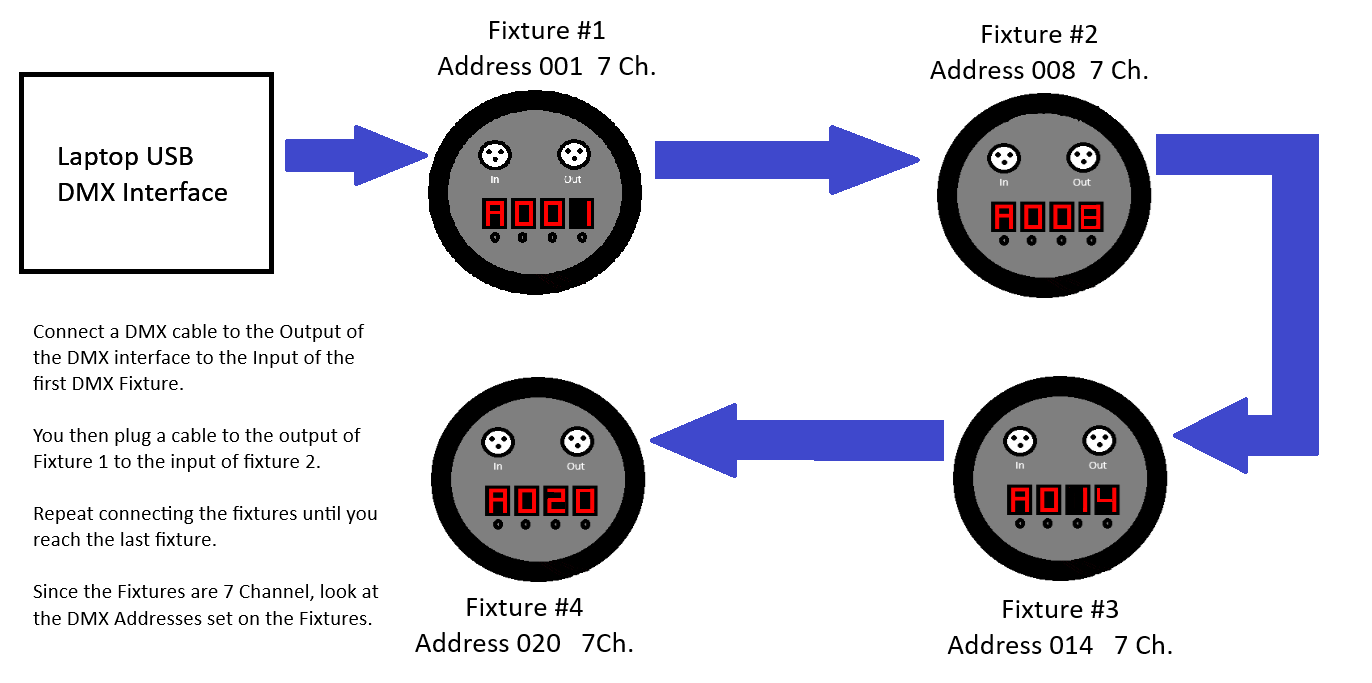
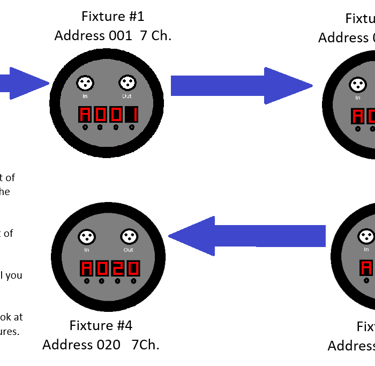
You use DMX cables to connect in one fixture and out to the next. DMX cables used to be 5 pin cables and some fixtures still use 5 pins but 3 pin has become the standard in a lot of the less exspensive fixtures. I never understood why there even was 5 pins since only 3 was ever utilzed. So...DMX cables I use are exactly the same as XLR Microphone cables (3 Pin). Many sources say you cannot use a XLR microphone cable in place of an actual DMX cable but I have done it for many years and had not a single issue doing it. So in my opinion, you can use regular microphone cables in place of exspensive DMX cables. It may be a probelm using actual DMX cables for Microphone cables but I never tried that. Your milage may vary.