The First Lighting System built for Weekend Musicians. GigLights is an Automated Lighting Software Program for the Weekend Warrior. Elevate your live shows with automated lighting that doesn't use tracks but actually listens to your LIVE music, syncs to your beat and senses your energy. All hands free, all night. You are free to play your instrument and not worry about the light show. GigLights has you covered.
There are tons of features but it really is very easy to use. Don't be intimidated. I will show you everything to have you up and running super fast.

Automated Lighting Software
So What Does GigLights Actually Do?
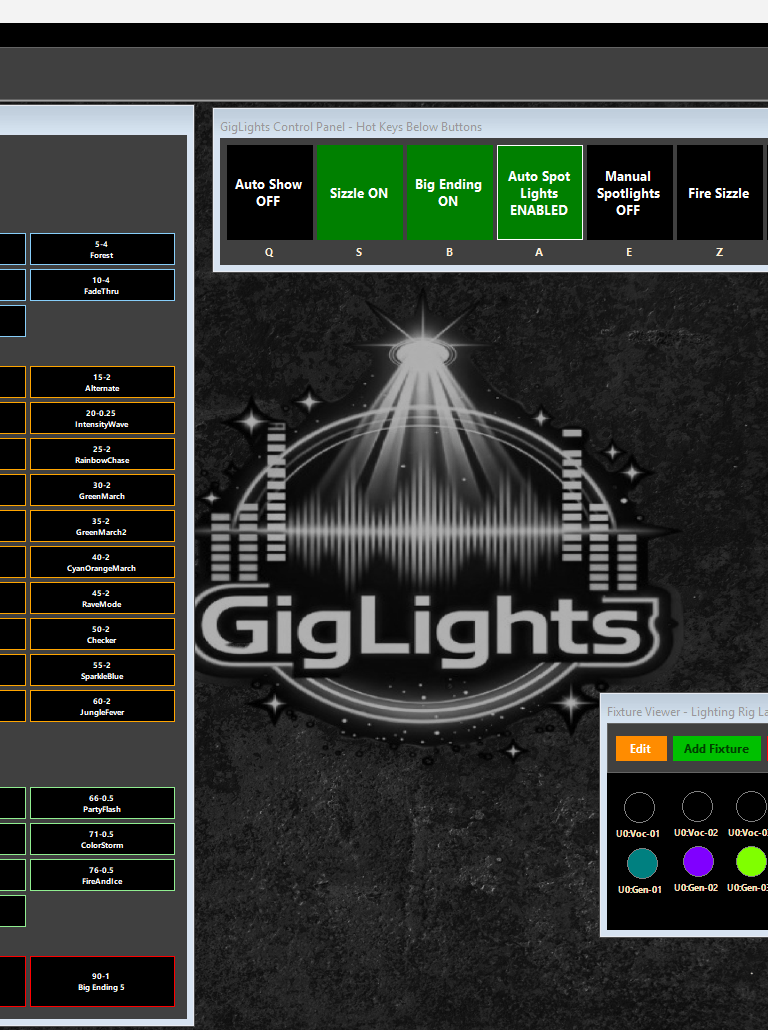
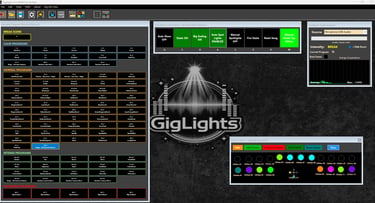
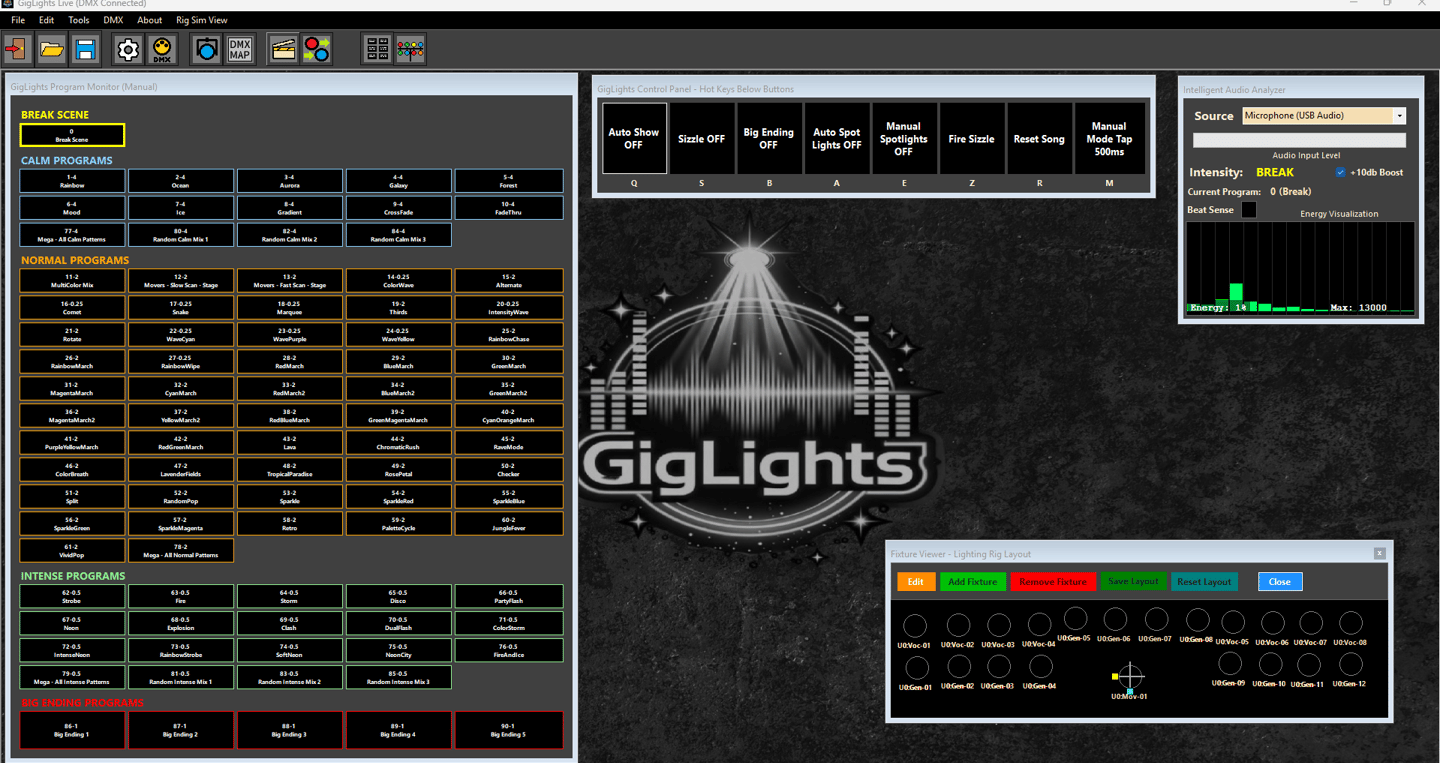
GigLights is the first lighting program created just for weekend gigging bands who are playing the clubs. GigLights will put on a lightshow for your crowd based on your LIVE music and doesn't require tracks. Using an external microphone, internal mic or line in, GigLights will listen intently to the music your band is playing and will sync right to the beat and tempo. It will then also analyze the music content and figure out the Energy of what you are playing, even as it changes throughout a song. GigLights will select chases that are pre-setup based on the energy it senses. The chases will be timed right to the beat of your music.
When the song is over, GigLights knows it. GigLights will switch to a "Break" scene which can be all black or a dark blue like I use. It can be anything you want.
You can also have it control vocalist lights. When GigLights hears music in the voice frequency, it will turn on whatever you have setup as vocal lights (if you set them up). When it doesn't hear the vocal range, it turns them off (they can be be set to fade out slowly).
Along with all that, it can sense "Big Endings" and have special chases for that. It also senses "Sizzle" like the crash of cymbals and have a strobe flash scene for that.
And that is just some of the features...
Built for the Weekend Warriors

Why Did I Make GigLights? A Little History...
I'm a keyboard player in multiple bands. In one of the bands, our guitar player/lead singer has a midi footpedal board for controlling lights. In my other band, I control the lights. Both are constant hands on (or feet on) for every song. When you're playing keys, it's not easy to start songs when you have to start the lights also. Keeping them in sync is mostly impossible.
Most local bands will setup some lights, turn them on and never change them. Others set them up and put them in audio mode (yikes). I feel a good band needs a good light show. A good light show, even for small local bands adds so much and just enhances the performances. People will notice even though they may not say, "hey your lights are great" or "your lights suck", but they will notice. At the rate of pay most bands get in the clubs now-a-days, most can't afford to pay a lighting person (or even a sound person in most cases) if they want to take home anything at all. There was no software taylored to musicians that are doing those weekend gigs in the clubs.
Since I was a programmer/coder in a past life (and still am to an extent), I decided to create my own system that did everything for me. It was a big ambitious task but I pulled it off. I started small at first with just a couple helper tools to help run other lighting software and it eventually bloomed into the full featured lighting program I call GigLights. Created for the barroom/club bands that need a decent light show without having to touch it. GigLights does it all without touching it all night. See more about it below.
Features - There's a Lot
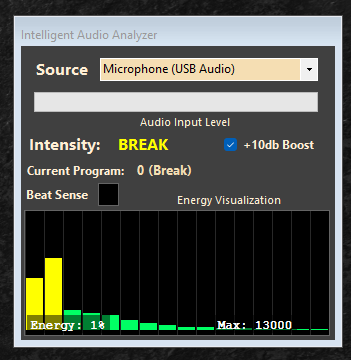
Real-Time Audio Processing: Analyzes microphone/line input to detect beats, energy levels, and frequency content
Multi-Frequency Tracking: Monitors punch (kick), mids (snare), and sizzle (cymbals) frequencies with independent thresholds
Adaptive Beat Detection: Tracks tempo changes dynamically with lockable beat sync LIVE! No tracks needed!
Energy Visualization: Real-time graphical representation of audio energy levels across frequency bands
Silence Detection: Automatically detects song breaks and resets lighting states


Intelligent Audio Analysis & Beat Detection
DMX Light Controller Configuration
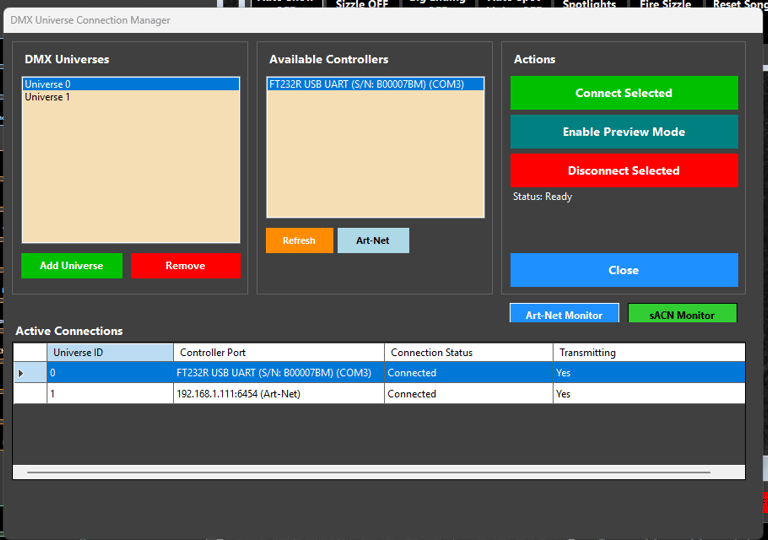
Multi-Universe Support: Control multiple DMX universes simultaneously
DMX Protocol Support: Both Open DMX USB (raw serial) and Enttec DMX USB Pro (packet protocol) with automatic detection. That means cheap USB DMX adapters are supported.
Art-Net Networking: Transmit DMX data over Ethernet for distributed lighting systems
Performance Critical: Optimized with pre-allocated buffers and precise timing (35 FPS) to prevent jitter and blackouts
Also supports sACN E1.31 controllers like the DMXKing Pro 1
Fixture Configuration: Create and manage complex DMX fixtures with channel subfunctions and custom programming
Chase Engine & Tempo Control
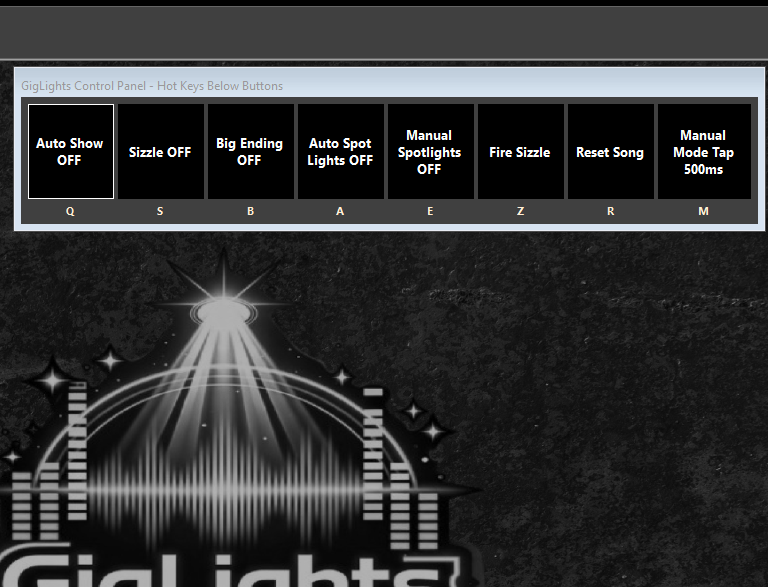
Beat-Locked Chasing: Synchronizes lighting patterns to detected audio beats, ALL LIVE. No tracks or audio file needed.
Manual Tempo Control: In Manual mode, tap-tempo button for user-controlled chase speed adjustment
Headroom for Lock Contention: Carefully tuned frame rates prevent USB congestion
Smooth Transitions: Fade-in/fade-out effects with configurable timing
Scene & Program Management
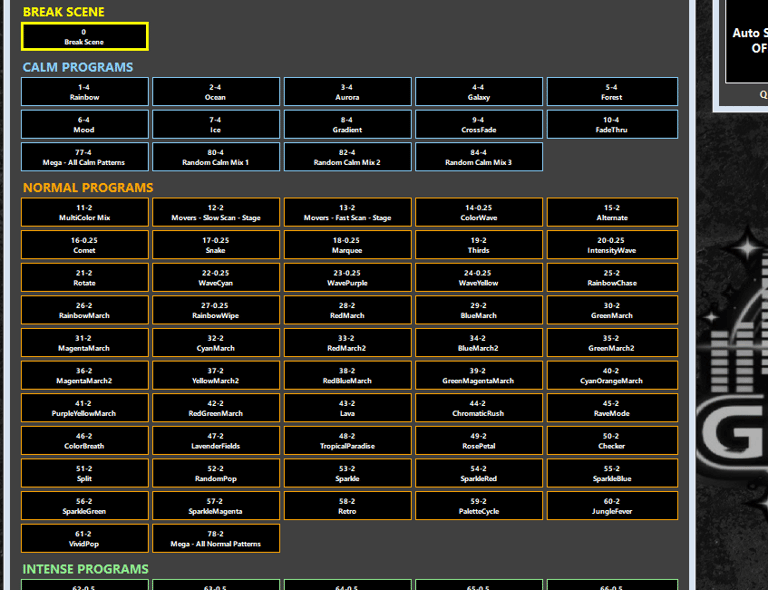
Programs: Pre-programmed lighting scenes grouped, triggered automatically by beats or manual selection in manual mode. Create ordered sequences of scenes for structured performances
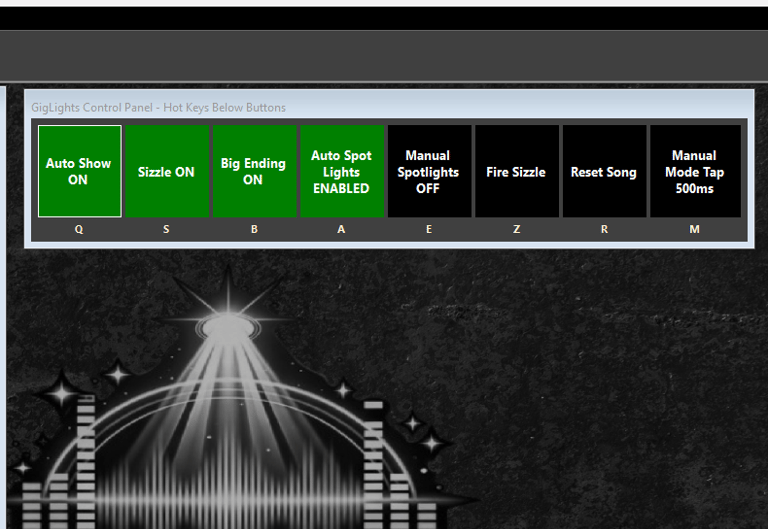
Auto/Manual Modes: Switch between automatic beat-driven control and manual button triggering
Mood-Based Lighting: Different scene types (Break, Calm, Normal, Intense, Sizzle) for varied aesthetics
Advanced Lighting Effects
Fade Engine: Smooth channel value transitions with independent fade timing per channel
HTP Mixing: Highest-Takes-Precedence blending when multiple scenes affect the same channels
Spotlight Effects: Automatic vocal detection triggers dedicated spotlight scenes
Sizzle Events: High-frequency cymbal detection triggers strobe/flash effects
Big Ending Detection: Recognizes song climaxes for dramatic finale lighting
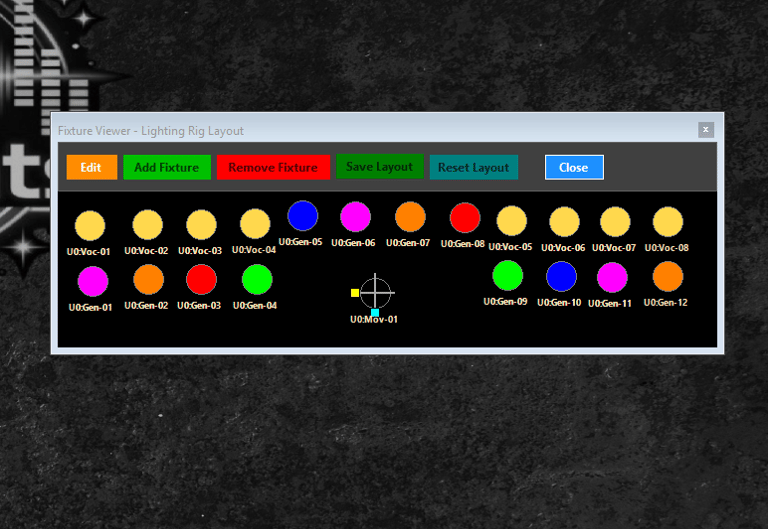
Fixture Rig Simulator
Simulates your lighting rig. Put the fixtures where you want them on the display.
Each fixture will show if it is on and the color it is set to. It crresponds to the actual DMX values your fixtures are set to.
Even moveable spot positions are shown with a light with an XY bar pattern along with the color they are set to.
All setup is saved for the next time you startup the app.
Other Notable Feature (The Icing On The Cake)
Get up and running fast with the Program Wizard. The Program Wizard creates almost a hundred Programs for use with the Auto Program functionality. These are based off of the fixtures you have configured into the DMX map. So every bands scenes will be different.
The Program Wizard generates about 100 mild, normal and intense Programs from 500+ scenes that are automatically created. This gets you up and running fast. Programs become the Auto Program Buttons that are used while running in Auto Show mode.
Once you enter your fixtures into the DMX Map, there is a print button to print out your map and take it around to set the DMX values on your fixtures. Yea, I thought of everything because I've been there before.
There are lots of other utilities built in to help keep the system running like a config file fixer just in case, a DMX monitor, DMX channel sliders for testing, Hot Key setup, MIDI Configuration, a collect windows in case you move to aonther computer and your tools go off screen, non program scenes that can be run manually, one side allows multiple buttons on at the same time, the other side... only one button on at a time.
I Told you there is a lot of features.
Great for Weekend Bands, Small Venu House Lights, DJs, Soloists and even Lighting People also
So What Does It Take To Run This Thing?
I haven't released the program yet. The Program is complete. It's Microsoft's code signing I'm trying to implement without costing me a fortune. If I sell it on Microsoft's store, I may be able to do it faster. Otherwise you get that "Unknown Publisher" message from Windows that tells you it's not safe to run the program because it's not "Signed Code" even though GigLights is safe. Thanks Microsoft for spanking the little guys.
Anyway, once it's available, it won't cost a fortune and it won't be a subscription. I hate those and so do bands.
What will it take to run GigLights?
It runs on a PC so you will have to have a computer or simple laptop to run it on. It doesn't use a whole lot of CPU so you don't need a gaming system to run it.
You will need a microphone for the audio pickup. I use a USB microphone adapter and use a good 'ole SM58 for the sound pickup. Works great. You can use your laptop microphones but those usually don't pick up a lot of the bass frequencies you need. You can also hook directly into your soundboard on an aux out. Be careful there and make sure you keep the aux at lower volume so you don't blow your laptops input. Make sure your aux has the whole mix with the drums nice and present.
You will need a DMX controller/Adapter to hook up to your PC/Laptop. I use a $17 USB to DMX adapter from Amazon (these are usually like a FT232R chip interface or something like that). Just get a USB DMX controller from Amazon. If you have a ENTEC USB DMX Pro, I made the program work with those also. You can also use E1.31 adapters. Those though are all expenseive options so if you have one, fine, use it. Otherwise a cheap USB DMX adapter from Amazon will work.
You will need DMX lights. If you are just starting out, you don't need to buy fixtures that cost hundreds of dollars a fixture. You can light a bar band well with a bunch of cheaper Amazon fixtures. I have a two light pole trees that hold 4 on each side of the stage. I also put about 8 to 12 across the back pointing at the audience for visual effect (eye candy). I also use a couple moving heads also which can be configured into GigLights. I also use some cheaper fixtures for spotlights for the front singers. There are special spotlight functions built into GigLights just for vocal spots. So light up your band with 2 to 4 fixtures on each side of the stage and put as many as you can get in the back (well not too many) facing the audience.
Once you have all those fixtures configured into GigLights, the magic will happen when you click "Auto Show". All of the setup will be detailed in the setup section I will put up when GigLights is released.
Still With Me? You Definitely Want Automated Stage Lights!
Would you like to know when GigLights is available? Send me an email

Or... Subscribe to our email list below...
Drop Me A Line Below...
Copyright(c) 2025 GigLights.com